Unreal Essential Training (2016) Tutorial Blog Part 8
Post-Process Effects
Anti-aliasing: Clearer view for Rendering a Game. (2 Picture to show a difference)
Kind of hard to tell, but pay attention to the edges or so.


Tone Mapping: Effects Lighting in a different way ( 2 Pictures ) *Located in Show under Post Processing effects* Can be used to effect the time of day the game takes.


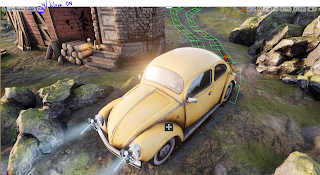
Adding a bloom effect: How to interact with the light reflecting, bouncing in the game. On this tutorial it works more on a vehicle. (2 Pictures to show the difference) *Located in the same area as tone mapping 2nd picture shows where.* Reflection on the window [ makes it look more realistic]

Lighting components:
Location & Video to show each one.

Anti-aliasing: Clearer view for Rendering a Game. (2 Picture to show a difference)
Kind of hard to tell, but pay attention to the edges or so.


Tone Mapping: Effects Lighting in a different way ( 2 Pictures ) *Located in Show under Post Processing effects* Can be used to effect the time of day the game takes.


Adding a bloom effect: How to interact with the light reflecting, bouncing in the game. On this tutorial it works more on a vehicle. (2 Pictures to show the difference) *Located in the same area as tone mapping 2nd picture shows where.* Reflection on the window [ makes it look more realistic]


Lighting components:
Location & Video to show each one.


Comments
Post a Comment